
Workflow
Workflow are some action you can through Goliac UI. There are currently:
- noop (to test)
- forcemerge (to bypass pullrequest review)
A workflow can have few different steps, especially create a slack message, create a jira ticket...
To create a workflow you need to
- define a workflow in
/workflowsdirectory - enable it in
/goliac.yaml
Register the Github App
To be able to enable the workflows, you need to register the Github Appwith OAuth permissions. To do so
- go to the Github App settings (like https://github.com/organizations/AlayaCare/settings/apps/alayacare-goliac)
- you need to create a client secret (if you don't have one already)
- in General, under Identifying and authorizing users
- set the Callback URL to
https://<Goliac DNS endpoint>/api/v1/auth/callback
- set the Callback URL to
- and you need to set the following (new) environment variables:
GOLIAC_GITHUB_APP_CLIENT_SECRET(the secret associated with the webhook)GOLIAC_GITHUB_APP_CALLBACK_URL(theCallback URLof your Github App)
Note: to create an Atlassian API token, follow the instructions here.
Create a PullRequest Review (breaking glass) workflow
To enable the Breaking Glass workflow, you need to
- create (or several)
/workflows/_afile_.yaml:
apiVersion: v1
kind: Workflow
name: _afile_
spec:
  description: General breaking glass PR merge workflow
  workflow_type: forcemerge
  repositories:
    allowed:
      - .* # you can use ~ALL
    # except:
    #   - .*-private
  acls:
    allowed:
      - team4
    #   - otherteam.*
    #   - ~ALL
    # except:
    #   - team1
  steps: # optional step to execute before force merging the PR
    - name: jira_ticket_creation
      properties:
        project_key: SRE
        issue_type: Bug
    - name: slack_notification
      properties:
channel: sre- update the
/goliac.yamlfile to include the new workflow:
...
workflows:
- _afile_
Create a noop workflow
If you want to test a workflow before enabling it for everyone, you can create a No Operation workflow, same as forcemerge but the workflow_type as to be noop:
apiVersion: v1
kind: Workflow
name: _afile_
spec:
  description: Testing workflow
  workflow_type: noop
  repositories:
    allowed:
      - .* # you can use ~ALL
    # except:
    #   - .*-private
  acls:
    allowed:
      - team4
    #   - otherteam.*
    #   - ~ALL
    # except:
    #   - team1
  steps: # optional step to execute before force merging the PR
    - name: jira_ticket_creation
      properties:
        project_key: SRE
        issue_type: Bug
    - name: slack_notification
      properties:
channel: sre- update the
/goliac.yamlfile to include the new workflow:
...
workflows:
- _afile_
The ACL section
The ACL are here to let you know for this workflow
- who can see / action it
- on which repositories
The ACL section has two fields:
allowed: list of teams or users that can see / action itexcept: list of teams or users that should be excluded
The except field can contain:
- a list of teams (e.g.
team1,team2) - a list of regular expressions on teams (e.g.
team.*)
The allowed field can contain:
- a list of teams (e.g.
team1,team2) - a list of regular expressions on teams (e.g.
team.*) - the special value
~ALLto allow all teams - the special value
~GOLIAC_REPOSITORY_APPROVERSto fetch the list of repository approvers from the.goliac/forcemerge.approversfile in the repository
The .goliac/forcemerge.approvers file in the repository has the following format:
teams:
- team1
- team2
users:
- username1
- username2
For example: if you have a user defined in the users/org/ directory (e.g. users/org/firstname_lastname@mycompany.com.yaml), you can add it to the users section of the .goliac/forcemerge.approvers file:
users:
- firstname_lastname@mycompany.com
If you have a team defined in the teams/ directory (e.g. teams/My Team/team.yaml), you can add it to the teams section of the .goliac/forcemerge.approvers file:
teams:
- My Team
Use the Jira step
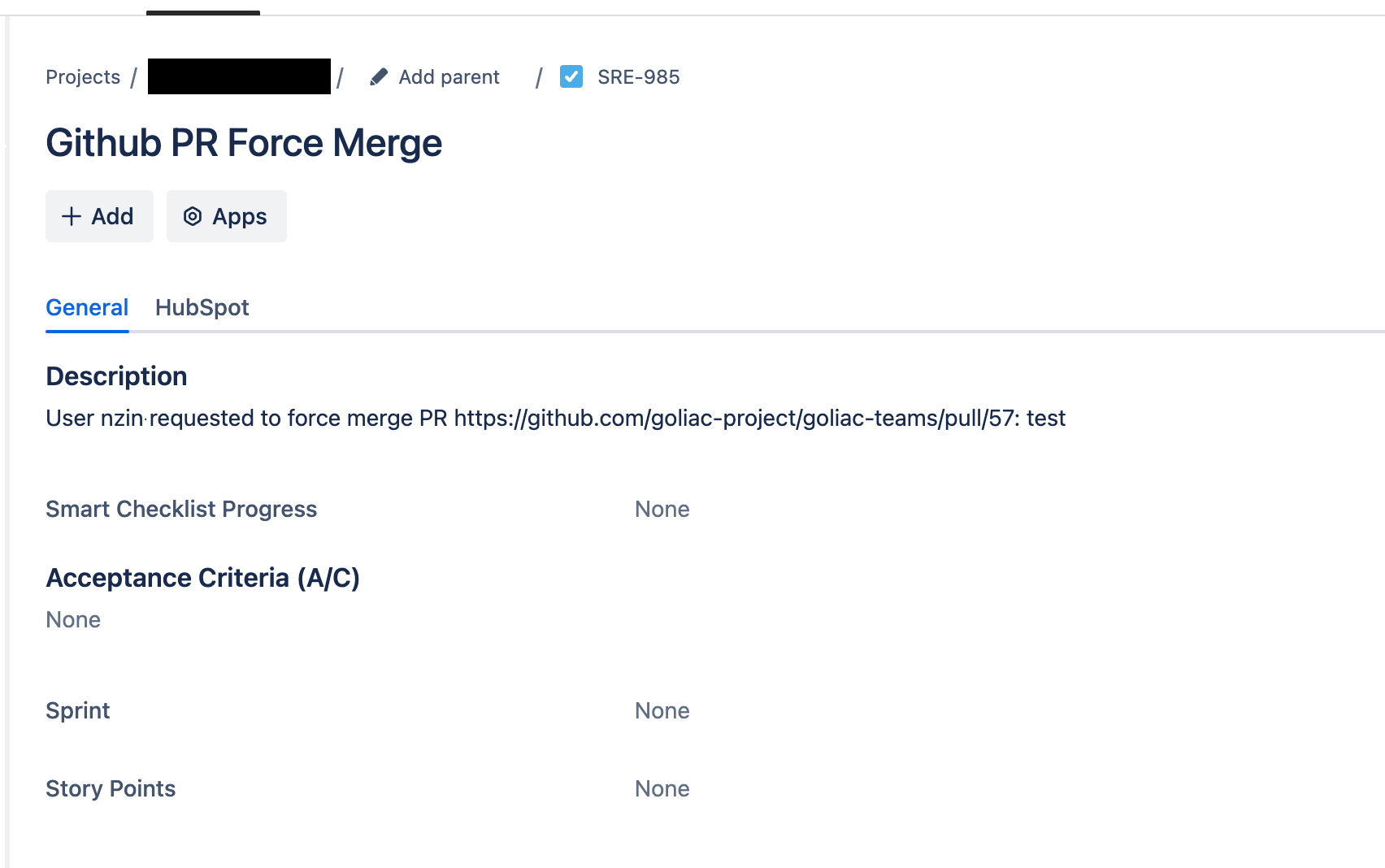
The Jira step is optional and can be used to create a Jira issue before force merging the PR. The step is defined as follows:
steps:
  - name: jira_ticket_creation
    properties:
      project_key: SRE
      issue_type: Bug
You will need to set the following environment variables:
GOLIAC_WORKFLOW_JIRA_ATLASSIAN_DOMAINlikemycompany.atlassian.netorhttps://mycompany.atlassian.netGOLIAC_WORKFLOW_JIRA_EMAILof the service accountGOLIAC_WORKFLOW_JIRA_API_TOKENof the service account
Use the Slack step
The Slack step is optional and can be used to send a notification to a Slack channel before force merging the PR. The step is defined as follows:
steps:
  - name: slack_notification
    properties:
      channel: sre
You will need to set the following environment variables:
GOLIAC_SLACK_TOKENthe Slack tokenGOLIAC_SLACK_CHANNELthe Slack channel
Dont forget to invite the Slack bot to the channel.
Use the DynamoDB step
The DynamoDB step is optional and can be used to store the workflow in a DynamoDB table. The step is defined as follows:
steps:
  - name: dynamodb
You will need to set the following environment variables:
GOLIAC_WORKFLOW_DYNAMODB_TABLE_NAMEthe DynamoDB table name
To create the DynamoDB table, use the following AWS CLI command:
aws dynamodb create-table \
    --table-name your-table-name \
    --attribute-definitions \
        AttributeName=pull_request,AttributeType=S \
        AttributeName=timestamp,AttributeType=S \
    --key-schema \
        AttributeName=pull_request,KeyType=HASH \
        AttributeName=timestamp,KeyType=RANGE \
    --global-secondary-indexes \
        "[
            {
                \"IndexName\": \"TimestampIndex\",
                \"KeySchema\": [
                    {\"AttributeName\":\"timestamp\",\"KeyType\":\"HASH\"}
                ],
                \"Projection\": {
                    \"ProjectionType\":\"ALL\"
                }
            }
        ]" \
    --billing-mode PAY_PER_REQUEST
or in terraform:
resource "aws_dynamodb_table" "goliac_forcemerge_audit" {
  name = "your-table-name"
  billing_mode = "PAY_PER_REQUEST"
  hash_key = "pull_request"
  range_key = "timestamp"
  attribute {
    name = "pull_request"
    type = "S"
  }
  attribute {
    name = "timestamp"
    type = "N"
  }
  global_secondary_index {
    name = "TimestampIndex"
    hash_key = "timestamp"
    projection_type = "ALL"
  }
}
This creates a table with:
- Primary key: pull_request (HASH)
- Range key: timestamp (RANGE)
- Global Secondary Index: timestamp (HASH)
- Pay-per-request billing mode